

Click the button to start reading
Communication Hacks for Managers: How to Say Less and Achieve More
You’ve seen it—message threads that scroll for miles, replies packed with polite filler, meetings that feel like verbal marathons.
While everyone talks, projects stall.
Great managers flip that script: they wield fewer words to create faster progress.
This expanded guide hands you the complete playbook: razor-sharp messaging frameworks, inbox-saving email etiquette, voice-of-confidence speaking tricks, and time-tested scripts to slash miscommunication in half. Use them and watch your team move from ambiguity to action—at sprint speed.

Why Fewer Words Deliver Bigger Results
Every extra sentence forces your teammates to decode, triage, and remember one more detail. Multiply that by dozens of chats, emails, and calls each day, and cognitive overload hits hard. By stripping your communication to the essentials, you free up mental bandwidth for execution. The payoff is measurable:
- Decision time drops because objectives are unmistakable.
- Back-and-forth shrinks as questions vanish.
- Accountability rises when tasks carry crystal-clear owners and deadlines.
The Ripple Effect on Culture
Brevity is not just a productivity hack—it’s a cultural signal. When you model tight, purposeful messages, you tell your team their time is valuable. Over weeks, you’ll notice shorter meetings, leaner docs, and a fresh bias toward action. Clarity becomes contagious.
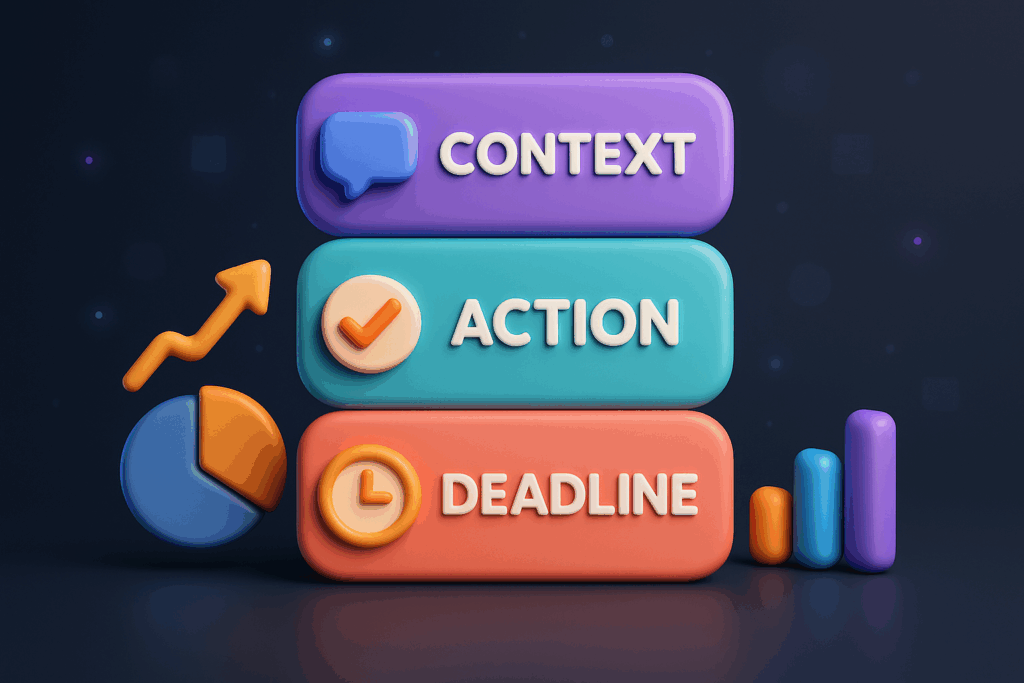
The Clarity Framework: A Three-Line Message Formula
Whenever you send instructions, feedback, or updates, deploy this three-line structure. It forces precision in under 30 seconds:
- Context → Why this message matters right now.
- Action → A direct request starting with a verb (“Draft,” “Approve,” “Ship”).
- Deadline → Exact date or time plus an escalation path if timing slips.
Example Slack DM:
Context → Q2 board deck is due Friday.
Action  → Please polish the revenue slide.
Deadline→ EOD Wednesday; ping me if blockers pop up.
Advanced Add-Ons
- Owner Tag: Kick off with
@Nameso accountability is immediate. - Resource Link: Drop the relevant doc so no one hunts.
- Success Snapshot: One line describing “done” to kill hidden assumptions.
Bulletproof Messages: Trim Fat, Keep Meaning
Treat every word like an expense. If it doesn’t earn its keep, cut it. Run your draft through this triage checklist:
| Trim This | Replace With |
|---|---|
| “I just wanted to quickly check if…” | “Check if…” |
| “It would be great if we could possibly…” | “Please…” |
| “At this point in time” | “Now” |
| “In order to” | “To” |
| “Due to the fact that” | “Because” |
30-Percent Rule: Draft the message, then delete at least 30 percent. The meaning stays; the fog disappears.
Voice Tone Tweaks
Clipped does not equal cold. Keep your tone human by sprinkling micro-empathy:
- “Thanks for jumping on this.” (gratitude, four words)
- “Let me know if unclear.” (support, six words)

Email Etiquette That Rescues Inboxes
1. Subject Lines That Act Like Headlines
Your subject line is a tiny billboard. Start with an action and a deadline, then add the topic. Examples:
[ACTION] Approve Q2 budget – Thu 3 PM[INFO] Q1 Customer Insights – Read before stand-up
2. One Thread, One Topic
Multiple topics hide accountability and wreck searchability. If the conversation drifts, branch a fresh thread. Future you will thank present you.
3. BLUF (Bottom Line Up Front)
Place the ask in the opening line. Background comes later. Busy readers decide in three seconds whether to keep scrolling.
4. BCC and CC With Purpose
CC only those who must take action or be aware today. BCC stakeholders on FYI roundups, or house updates in Teamly’s shared docs where they can catch up asynchronously.
Ready-to-Send Template
Subject:  Approve Product Launch Copy – Tues 5 PM
Hi team,
🏁 BLUF: Approve attached copy deck for new landing page.
WHY: Dev begins Wed 9 AM.
WHEN: Reply “Approved” or add comments by 5 PM Tues.
Thanks!

Speak With Precision: Say It Once, Say It Right
The Point-Proof-Path Mini-Framework
Before unmuting in a meeting, jot three bullets:
- Point: The single insight, decision, or ask.
- Proof: One data point or story that grounds it.
- Path: The next action the group should take.
Meeting script:
“Here’s the decision: launch on May 12.
Traffic data shows 18 percent higher conversions on Tuesdays.
If no objections by 4 PM, Dev updates timelines.”
Handling Curveballs in Real Time
When a discussion veers off course, deploy a Reset Cue:
- Observe: “We’re veering into tactics.”
- Anchor: “Our goal is to confirm budget.”
- Redirect: “Let’s park tactical ideas in the doc and nail budget first.”
Non-Verbal Compression
Silence is a tool. After you state your Point, pause. The room processes. Questions surface faster than if you keep talking. You save words and invite engagement.

Scripts for High-Impact Moments
1. Delivering Constructive Feedback
Context: “Yesterday’s deployment missed the deadline.”
Action: “Document blockers in the task board within two hours.”
Deadline: “Send me a Slack ping by 3 PM so we prevent repeats.”
2. Resetting a Derailing Meeting
Point: “We’re off agenda.”
Proof: “We’re still on item 2 but should be on item 4.”
Path: “Let’s park side issues, finish item 3 now.”
3. Clarifying Ownership in Group Threads
@Nina → Draft revised spec
@Kai  → QA prototype by Fri
@All  → Review in Teamly Monday 10 AM
4. Diffusing Email Overload
When ten people are copied on a swirling thread, declare a Decision Email:
Subject: DECISION – Q3 Event Venue
BLUF: We are booking Venue A (cost, capacity met).
Thread closed. Future updates via Teamly “Event Planning” board.
5. Sync vs. Async Decision Tree
| If… | Then Use… |
|---|---|
| Information ≤ 3 sentences | Chat message |
| Decision needs context and docs | Email with BLUF |
| High-stakes, multiple functions | 15-min meeting with Point-Proof-Path |
Common Pitfalls and How to Dodge Them
- Over-explaining: You fear being misunderstood, so you bury the reader in detail. Fix: Link to resources; don’t paste them.
- Passive verbs: “The report was finalized” hides who did the work. Name the doer.
- Group asks: If everyone owns it, no one owns it. Assign one owner.
Remote Twist: Keeping Global Teams in Sync
Distributed teams amplify the cost of sloppy words. Add these tweaks:
- Time-Zone Labels: State deadlines in UTC plus your reader’s local time.
- Video TL;DRs: Record a 60-second Loom summarizing complex docs; add to Teamly for async catch-up.
- Weekly “Noise Audit”: Each Friday, cut one recurring meeting or consolidate two threads.
Case Study: The 7-Day Brevity Challenge
Last quarter, a SaaS support team of 18 adopted these hacks. They:
- Switched to the Clarity Framework for every ticket hand-off.
- Moved status updates into a single Teamly doc—no more email digests.
- Banned meetings longer than 25 minutes without a Point-Proof-Path agenda.
Results after one week:
- Resolution time down 22 percent.
- Internal email volume down 38 percent.
- Customer CSAT up 9 points (faster answers, less confusion).
Next Steps: Put Brevity to Work Today
- Adopt the Clarity Framework for every message this week.
- Stock your email templates in Teamly to keep your inbox razor-sharp.
- Open each meeting with a Point-Proof-Path outline to halve discussion time.
- Run a Friday Noise Audit: kill one meeting, condense one thread.
Implement these habits for seven days and track the metrics: fewer emails, shorter meetings, faster projects. You’ll prove—beyond debate—that the manager who says less truly achieves more.